


Webex
4.11.38K Reviews
App Specs
- Version
- Varies with Device
- Updated On
- License
- Free
- Downloads
- 10,000,000+
- Developer
- Cisco Systems, Inc.
- Categories
- Business
- Platform
- Android, iOS
Screenshots
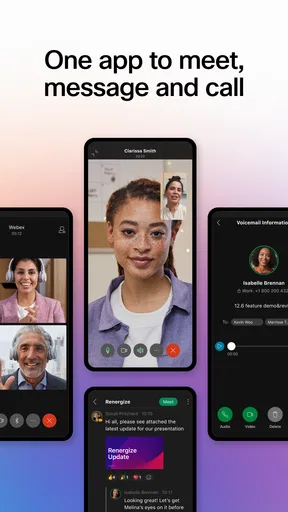



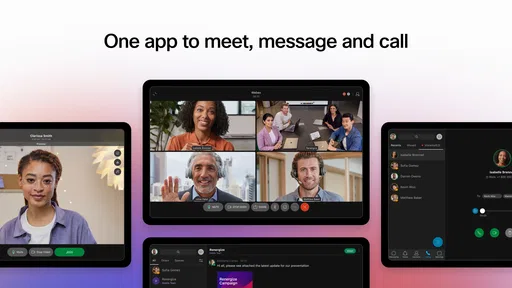
 Analysis by AppCompare
Hey there! So, I've been diving into the world of Webex lately, and let me tell you, it's quite the app. Whether you're working from home or in the office, this app is like having a virtual office in your pocket. Let me walk you through my experience with it.
Why it feels useful in the first week
The early appeal of Webex is easy to understand: one place can cover a meeting, a project conversation, and the documents people need to discuss. I find that particularly helpful when a team is already using Webex at work. Instead of asking a new colleague to juggle several services, I can point them to the same app for joining a call and following the related conversation.
That convenience matters most when the workday is fragmented. Imagine a teammate sends a meeting invite while I am away from my desk, then asks me to review a presentation shortly before the call. Having meeting access and team messages on my phone makes it easier to respond without waiting until I get back to a computer. I would still do detailed editing on a larger screen, but the phone is useful for staying in the loop.
Webex is a business app from Cisco Systems, Inc., and its long presence in workplace communication shows in its focus on meetings and team coordination. It is free to install, rated for Everyone, and has an average rating of 4.3 from around 31,000 ratings, with more than 10 million installs. Those figures suggest it is familiar to many people, though the real reason to try it is whether your team already relies on it.
Getting Started with Webex
So, first things first, downloading Webex was a breeze. It's available on both Android and iOS, which is super convenient. Once you have it installed, setting up an account is straightforward. You just need to enter some basic info, and you're good to go. The interface is clean and intuitive, so navigating around is pretty easy, even if you’re not a tech wizard.
Features That Stand Out
Now, let’s talk about the features. Webex is packed with tools that make remote communication smooth as butter. You can host video meetings with up to 100 participants, which is great for large teams. The video quality is top-notch, and I didn't experience any annoying lags or drops during calls.
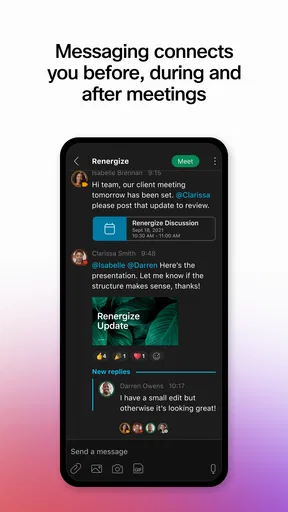
One feature I really love is the screen sharing capability. It’s perfect for presentations or just showing off your cat memes during meetings (hey, we all need a break sometimes!). Plus, the app offers a chat function where you can send messages, files, and even emojis. It’s like WhatsApp, but for work.
Worth Reading Before You Choose

Switching to Android Auto Means Rethinking Your Driving Routine

Google Calendar Makes a Crowded Week Easier to Manage

Baby Panda World Brings Quick Play to Modern Phones, but Its Game Library Feels Busy

ESPN’s Live Game View Makes Following Close Games Easier

QuizzLand Review: A Good Fit for Short Trivia Breaks, Not Every Player

Basketball Stars: Multiplayer Is Fast, but Can It Recover When Matches Go Wrong?
When the first-week novelty becomes a routine
The bigger test is whether Webex still earns a place on my phone once the new-app feeling disappears. For a team that schedules regular calls, the answer can be yes: opening the same app to check a meeting, message a coworker, or share a file creates a repeatable routine. That is more valuable than a long feature list if the team actually uses those tools every week.
A useful habit is to keep each project’s conversation in its own space rather than letting every question drift into one general chat. When I need to return to a decision, the project context gives me a better starting point than searching through unrelated messages. I also try to put the agenda or relevant file in the conversation before a meeting, so the call is used to settle questions rather than locate materials.
For a practical day-to-day example, a small operations team could use a space to coordinate a schedule change, share the updated document, and then meet briefly to resolve an exception. A sales group might use the same pattern to discuss a customer presentation and bring the final version into a call. These workflows work best when the team agrees on where decisions belong; otherwise, messages can still scatter across email, personal chats, and meeting notes.
Collaboration Made Easy
What's truly impressive about Webex is how it fosters collaboration. You can create spaces for different projects or teams, making it easy to keep track of conversations and tasks. The ability to integrate with other tools like Google Drive and Microsoft Office is a game changer. It means you can pull up documents and work on them without leaving the app.
And if you’re someone who loves organization (like me), you’ll appreciate the scheduling feature. You can set up meetings directly from the app, and it syncs with your calendar. No more double bookings or missing important calls!
Keeping the app useful without letting it take over
My maintenance advice is simple: be deliberate about notifications and spaces. If every conversation produces an alert, a collaboration app can turn into a second inbox that constantly interrupts whatever I am doing. I would keep alerts focused on direct requests and active projects, then mute or leave spaces that no longer need my attention. That small bit of housekeeping makes it easier to notice a genuinely urgent message.
It also helps to decide which tool is the source of truth for a document. Webex can bring a file into a discussion, but a team should know whether the current version lives in a shared drive or in a chat attachment. Without that agreement, people can waste time reviewing the wrong copy. I treat the app as a convenient place to talk around a document, not as a substitute for a clear file-management routine.
Security and Privacy
In today’s world, security is a big deal, and Webex doesn’t disappoint. The app has end-to-end encryption, so you know your conversations are safe. Plus, you have control over who joins your meetings, which adds an extra layer of security.
They’ve also added password protection for meetings, and there's a waiting room feature where participants can be vetted before joining. It’s like having a bouncer for your virtual meetings!
Where the trade-offs show up
There is a difference between having collaboration features and getting a team to use them consistently. If coworkers keep planning in email, discussing quick questions in another messenger, and only opening Webex for scheduled calls, the app may feel like one more destination rather than a central workspace. I would not move a whole team to it just because it can do several things; the change is worthwhile only if people agree to use it for a defined set of recurring tasks.
Webex also asks for a little more attention than a basic video-call app. Spaces, files, meeting schedules, and alerts are useful when they are maintained, but they can become clutter if old projects remain active or nobody closes the loop after a discussion. A short weekly check of active spaces and pending decisions can help, though teams that want a very lightweight chat-and-call setup may prefer a simpler tool.
Compared with a meeting-only service, Webex makes more sense when a call is part of continuing work rather than a one-off event. Compared with a general-purpose messenger, it is better suited to organized work conversations and scheduled meetings, while a casual group that mainly shares quick updates may find its structure unnecessary. I would also keep in mind that although the app is free to install, in-app purchases range from about $14 to $144 per item, so anyone considering paid options should check what their account or organization actually needs before committing.
Who is likely to keep it installed?
I think Webex is a good fit for people whose employer, clients, school, or project group already uses it. It is especially practical for someone who moves between meetings and needs to check a team conversation or shared file while away from a desk. It is less compelling for a person who only makes occasional calls with friends, or for a team that has no intention of organizing work in shared spaces.
If you are deciding whether to install it, I would first ask your team what it uses for meetings, where project messages belong, and how files are shared. That conversation answers a more important question than whether the app has enough features: will the people you need to reach actually be there? The minimum operating system requirement is version 11, so it is also worth checking that your device can run it before planning to rely on it.
Final Thoughts
Overall, Webex is a solid choice if you’re looking for a reliable communication and collaboration tool. It’s packed with features that cater to both small and large teams, and it does so without compromising on quality or security.
Whether you’re using it for work, school, or just to catch up with friends, Webex offers a seamless experience. If you haven’t tried it yet, give it a go. Who knows, it might just become an essential part of your daily routine, like coffee or that morning scroll through social media.
So, what are you waiting for? Download Webex and start connecting!
Pros
- Seamless integration with calendars.
- High-quality video and audio calls.
- Robust security features.
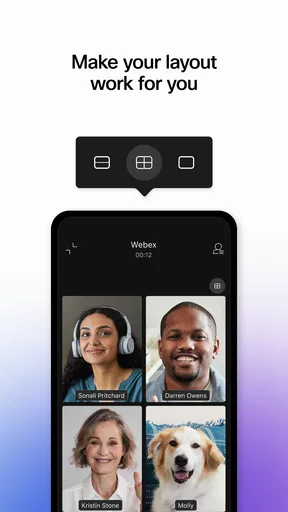
- Customizable meeting layouts.
- Mobile-friendly interface.
Cons
- Limited free plan features.
- Occasional connectivity issues.
- Complex settings for beginners.
- High resource usage on devices.
- Meeting duration limits on free tier.
FAQs for Webex
What are the main features of the Webex app?
Webex offers a comprehensive suite of features including video conferencing, screen sharing, messaging, file sharing, and integration with popular productivity tools. It also provides end-to-end encryption and customizable meeting layouts. The app is designed for both personal and professional use, making it versatile for various types of meetings and collaborations.
Is Webex free to use, and what are the limitations?
Webex offers a free plan that includes basic features like hosting meetings with up to 100 participants for 50 minutes. However, the free version lacks some advanced features like cloud recording and administrative controls. Paid plans offer enhanced capabilities, including longer meeting durations and additional security features, tailored for businesses.
How secure is Webex for hosting meetings?
Webex is known for its robust security measures, including end-to-end encryption, password protection for meetings, and compliance with global privacy standards. Cisco, the company behind Webex, regularly updates its security protocols to protect user data, making it a reliable choice for sensitive business communications.
Can Webex be integrated with other tools and platforms?
Yes, Webex integrates seamlessly with a variety of tools and platforms such as Microsoft Office 365, Google Workspace, Slack, and Salesforce. These integrations allow users to schedule meetings, share files, and manage tasks directly from their preferred applications, enhancing productivity and workflow efficiency.
Does Webex support mobile devices, and what are its capabilities on mobile?
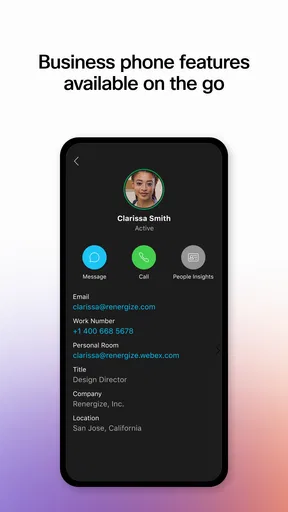
Webex supports both Android and iOS devices, offering a mobile app that retains most of the desktop version's features. Users can join meetings, share content, and communicate via chat or call while on the go. The mobile app is optimized for both smartphones and tablets, ensuring a smooth user experience.


